Showing posts with label hd. Show all posts

Wednesday, December 12, 2012

I Could Watch GoPro Clips Allllllllll Day

Personally, I think GoPro footage is always cool. And when they released the newest GoPro, the Hero3 series this past October, YouTube has been flooded with new (and pretty sweet) footage.


Seriously, turn this up to 720p (why it isn't automatically uploaded in HD is a shame because it looks stunning) and marvel at how pretty it all is. And on such a little camera. Amazing.


This video is also a favorite because I am terrified of heights. And planes (I'm really claustrophobic). But this is awesome, and also a little ironic because the skydiving club is called the "BombSquad" 


So yea, enjoy the videos, and I'll see you all in class soon!


Monday, December 10, 2012

Glidecam HD-2000

  This past month I was given the opportunity to use a Glidecam HD-2000 camera stabilizers to mount my camera and shoot handheld.  I just wanted to explain some tips I learned while using the stabilizer and talk about my experience.

  The Glidecam was suggested to me by one of my friends who owns one because he said it would aid in stabilizing shots and take out natural shakiness of simply shooting handheld.  I took his advice and he allowed me to borrow his Glidecam.  Upon first getting the Glidecam I had to recalibrate the stand for my own camera.  I found that since I only have a zoom lens for my DSLR I needed to extend the lengthen the main rod in order to counter balance the extra weight of my camera(this could also be achieved by adding extra weight to the stabilizers and keeping the stand the same weight, however it would make the rig heavier and more difficult to use).  After that I had to calibrate the rig to perfectly balance my camera so the rig would stay right side up.

  Once I finished calibrating I began to practice.  To properly use a Glidecam you must use two hands.  One hand to hold the handle which holds the majority of the rigs weight, and the other hand to lightly and delicately hold the main rod of the rig and point the camera.  After an extreme amount of practicing I went out to the shoot and used the rig.  I can honestly say that the camera not only increased perceived  the production value of the project, it substantially improved the quality of the work by allowing for fluid movements unattainable using simply a handheld camera.  Although our film encompassed both Glidcam and handheld shots (depending on motivation) I personally enjoyed watching back the shots taken on the Glidecam substantially more.  After using the Glidecam for only a short time I am convinced that this tool may be worth the investment in order to improve the quality of my projects.

Sunday, November 13, 2011

Mega-Misconceptions. Why Megapixels mean nothing.


So, I was just in a discussion with my roommate about what makes a high quality camera (He's a PC, and I'm a Mac, so we always get into tech debates). He was extolling the latest offering from Sony, which touts over 16 megapixels. Thinking he was talking about a video camera, I called foul. Though he was discussing a still camera with video capabilities, it sparked a discussion about the difference between resolution for video and still photography.

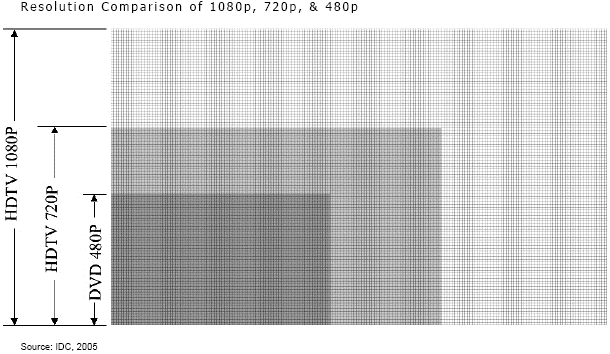
My roommate is a Photoshop junkie, and a bit of a HD fanatic. When I told him that DVD's resolution wasn't even half a megapixel, his jaw just about hit the floor. But it's true! Take a look at some common resolutions broken down below:
  • DVD - 720 x 480 = 345600 = .35 megapixels
  • 720p - 1280 x 720 = 921600 = .92 megapixels
  • 1080p - 1920 x 1080 = 2073600 = 2.07 megapixels
So right now, the gold standard of HD video is basically the same quality than my very first cellphone's camera, almost 6 years ago. What gives?


Well, for one, still photos use resolution in a very different way than video does. Traditionally, high quality printed images use 300 pixels per inch. The standard for media seen on any type of screen is actually only 72 pixels per inch. This originally stems from technical limitations (It's really hard to make screens with 300 pixels per inch, let alone process the signal to it), but it is part of the viewer's expectation, and seems totally normal to us now. If you were to print out a web image though, you could easily see the pixelation, which seems like a rather low quality picture on paper.

The the thing is, you never print videos onto paper, so video image quality never has to be seen in the harsh light of print. Even tech-lover director James Cameron isn't in a race for more pixels. He said, “4K (ultimate HD) is a concept born in fear. I would vastly prefer to see 2K/48 frames per second.” So there you have it! If 2 megapixel images are enough for James Cameron, then they are good enough for me!